

Your crew’s waiting for job details. Your estimator is rebuilding the same proposal because pricing has changed. Your sales manager doesn’t know if anyone followed up with last week’s hot lead. None of that is putting shingles on roofs.
Understanding how CRM improves roofing productivity starts with seeing where your team’s effort actually goes. This article compares manual workflows against CRM-enabled workflows to show exactly how eliminating coordination waste creates capacity for more jobs without adding crews or overhead.
Where Roofing Productivity Gets Lost
Before examining solutions, it’s worth identifying the biggest time drains in roofing operations without centralized digital workflows.
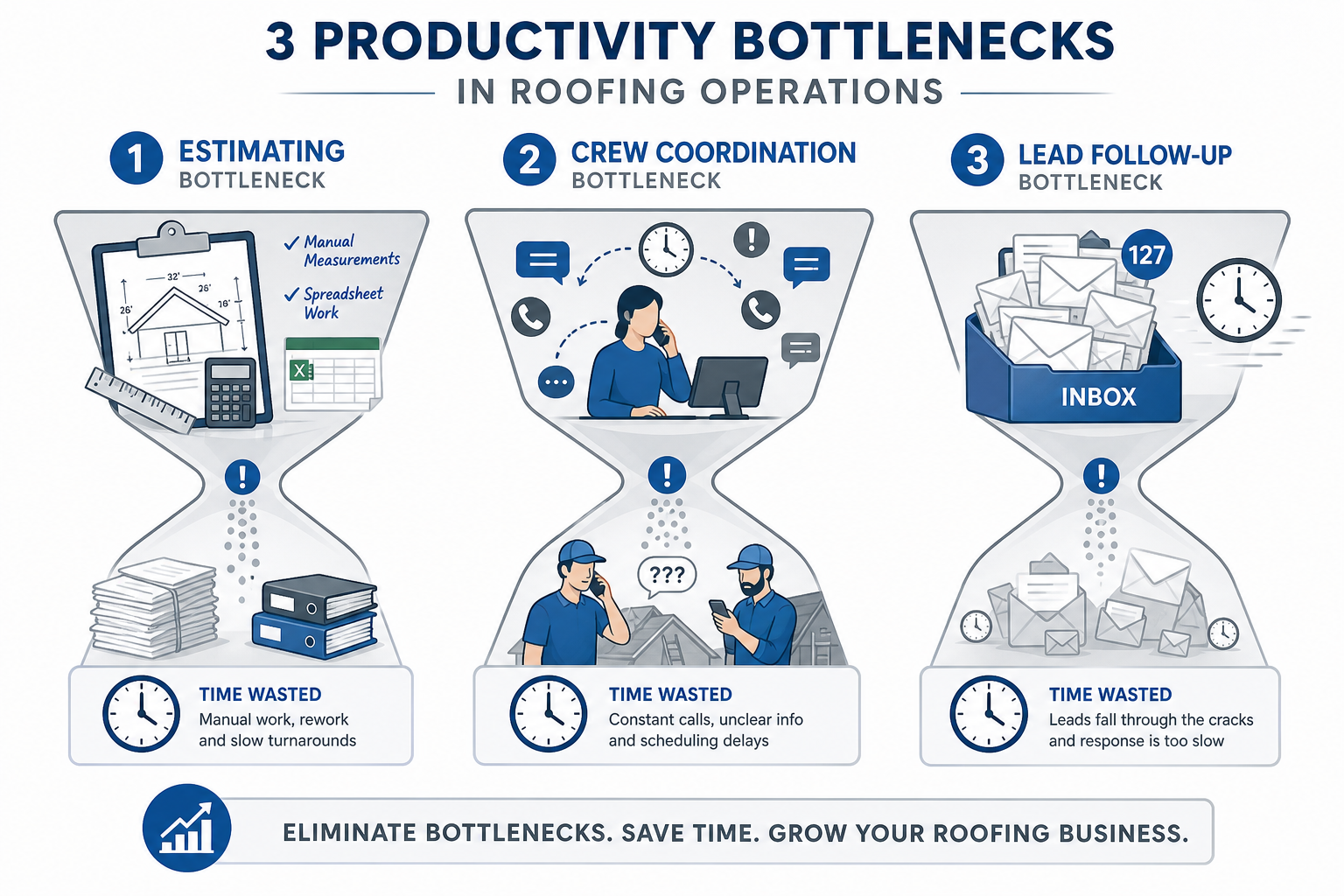
Manual estimating consumes hours per job. Your sales rep drives to the property, climbs the roof with a tape measure, drives back to the office, looks up material pricing from multiple supplier catalogs, builds a proposal in Word or Excel, and emails it to the homeowner. When the homeowner asks about upgrading materials, the rep rebuilds portions of the proposal from scratch. This cycle spans multiple hours and at least two trips.
Crew coordination happens through constant phone calls. Your operations manager calls crew leads to check availability, assigns jobs by updating a spreadsheet, and then calls each crew to communicate tomorrow’s schedule. Throughout the day, crew leads call the office to ask where materials are, what the access code is, and whether there have been any scope changes. Your office manager stops productive work to field these questions.
Leads sit in inboxes for hours. A homeowner submits a website form. Hours later, your sales rep sees it and calls back. The homeowner has already contacted faster competitors. Or you send an estimate, the homeowner says, “We’ll think about it,” and weeks pass without follow-up because nobody tracked it.
Manual processes don’t just waste time; they cap your capacity. Operations managers using spreadsheets and phone calls can effectively coordinate 2-3 crews before communication overhead becomes unmanageable. Sales reps who spend hours on manual estimates can only produce 8-10 quotes per week. Your growth hits a ceiling not because you lack skilled workers, but because coordination can’t scale.
How CRM Improves Roofing Productivity: Manual vs. Digital Workflows
Here’s what changes when you eliminate manual coordination across the three biggest productivity areas.
Estimating: From Hours to Minutes
Manual estimating workflow:
- Drive to the property, climb the roof, and measure manually
- Drive back to the office
- Look up material pricing from multiple sources
- Build a proposal in Word/Excel from scratch
- Homeowner requests changes, rebuild proposal manually
CRM-enabled estimating workflow:
- Order an aerial measurement report from the office or the truck
- Receive roof dimensions and square footage within minutes
- Select materials from the pre-built library with current pricing
- Generate a branded proposal automatically
- Homeowner requests changes; adjust one field, and the proposal recalculates
The productivity difference: Your sales rep can produce multiple detailed estimates in the time it used to take to drive to one property and climb the roof. This doesn’t just save hours: it doubles or triples the estimate capacity per rep. A rep who produced 8-10 estimates weekly can now produce 18-20 with the same work hours.
Crew Coordination: From Phone Tag to Mobile Access
Manual coordination workflow:
- The operations manager calls crew leads individually to check availability
- They update the spreadsheet and call each crew to communicate the schedule
- They text job addresses and customer contact info
- Throughout the day, crews call the office asking about materials, access codes, and scope details
- The office manager interrupts other work to answer questions
- Job completes, crew calls to report, the office manager updates the spreadsheet manually
CRM-enabled coordination workflow:
- The operations manager drags jobs to available crews on the dashboard
- The system pushes job details, materials, access codes, and notes to the crew lead’s mobile app automatically
- The crew views all information on the phone without calling the office
- The crew uploads progress photos to the job file from their phones
- The crew marks the job complete in the app, the system updates the status automatically
The productivity difference: Your crews aren’t stopping work to call the office for information they should already have. Your office staff isn’t fielding 20-30 calls daily from crews asking basic questions. Both sides stay productive. More importantly, this coordination efficiency determines scale. The same operations manager who could handle 3 crews manually can coordinate 5 crews with CRM dispatch tools because job details flow automatically instead of through phone calls.
Sales Follow-Up: From Missed Opportunities to Automated Sequences
Manual follow-up workflow:
- The lead submits the website form, and it sits in the inbox for hours
- A sales rep eventually sees it and calls back
- The homeowner has already contacted faster competitors
- The rep sends an estimate, the homeowner says, “We’ll think about it.”
- The rep adds a note to the spreadsheet to follow up next week
- A week passes, the rep forgets because the spreadsheet has dozens of rows
- The homeowner signs with competitor who stayed in contact
CRM-enabled follow-up workflow:
- The lead submits the form, the CRM captures it and alerts sales rep instantly
- The system sends an automatic confirmation text to homeowner
- The rep calls back within minutes
- The homeowner says, “We’ll think about it”
- The CRM schedules automated follow-up: email day 2, text day 5, call reminder day 10
- The rep stays engaged according to automated schedule
The productivity difference: You’re not losing deals because leads sat unchecked for hours. You’re not losing deals because nobody remembered to follow up. Fast response and consistent follow-up happen automatically instead of requiring manual tracking and memory.
How This Translates to Job Capacity
When you eliminate coordination waste across estimating, crew management, and sales, your business gains capacity without adding resources.
Example capacity scenario:
A roofing contractor currently running:
- 3 crews completing 10 jobs weekly
- 1 operations manager
- 2 sales reps
After implementing CRM:
- The same 3 crews can handle additional jobs because they’re not waiting for information or calling the office for details throughout the day
- The same operations manager can coordinate 4-5 crews when lead volume supports adding capacity, because dispatch and status tracking are automated
- The same 2 sales reps produce significantly more estimates because aerial measurements and proposal templates eliminate drive time and manual proposal building
The result: Your operation handles more job volume with the same crew headcount and office staff, plus the infrastructure to scale additional crews when demand supports it. The productivity gains come from eliminating the coordination bottlenecks that were capping volume.
Zuper’s Roofing CRM: Built for Field-First Productivity
Zuper combines CRM, scheduling, project management, invoicing, and mobile field access in one platform designed for how roofing contractors actually work.
Your estimator creates proposals with integrated aerial measurements in minutes instead of hours. The homeowner signs on their phone. Zuper auto-creates the job, assigns your crew, and pushes all job details to your crew lead’s mobile app. Your crew logs progress and uploads photos in seconds without calling the office. The invoice generates automatically when the job completes. Payment processes through the app and syncs to QuickBooks.
Zuper’s offline mobile access works when the cell signal drops on rural job sites. Mobile-first design means logging updates takes seconds, not minutes. And because everything lives on one platform rather than five disconnected tools, data flows automatically between estimating, scheduling, field tracking, and invoicing without manual handoffs.
Learn how CRM improves roofing productivity for your operation. Request a Zuper demo.